Tuesday, July 28, 2015

NAPPS has left the building (but is still on the front lawn)

A good standards effort defines specifications that build on the existing stack of underlying protocols, cryptographic techniques, data formats and platform capabilities. A better standards effort defines specifications that can adapt accordingly as that existing stack changes and evolves. The very best standards efforts know when to announce victory, pack their bags, and go home when that stack evolves in such a way to mitigate the value of the standard in the first place.

By this measure, NAPPS, the OIDF WG chartered to define mechanisms in support of an SSO experience for native applications, is an awesome standards effort.

As has been previously pointed out by John Bradley and myself, the mobile OSs are evolving their support for native SSO, both iOS and Android are adding new features that make SSO possible 'out of the box', without the introduction of specialized application software on the device, as the NAPPS group had been proposing. Consequently, the value of the 'Token Agent' model that NAPPS was proposing and standardizing is diminished - fundamentally we don't need to supplement the mobile OSs to achieve native SSO when they provide sufficient capabilities on their own.

Consequently, as John writes, the NAPPS WG is 'pivoting' and, rather than delivering a normative specification for the Token Agent role, will instead:

"...document best practices for Single Sign-on for Enterprise and Software as a Service Providers using these new features in combination with the PKCE specification, as well as filling in any remaining gaps to allow SaaS providers to fully support OAuth and OpenID Connect enabled native applications in a secure way without forcing users into extra unproductive logins."
NAPPS_blog.png
In addition to these sort of guidelines, there is discussion about the development of open source SDKs that would wrap up all these features and flows - simplifying for application developers how to hook into this native SSO model. Discussions are underway as to where development of these libraries make sense.
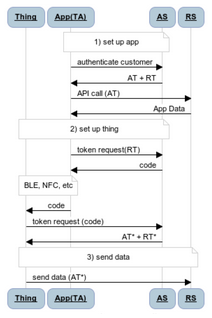
Interestingly, while the value of a Token Agent has been marginalized by the new mobile OS features for the native SSO use case, the TA model may yet find a home in the Internet of Things.

Many IoT devices are characterized by limited UI capabilities for display and user input - both of which are critical for the initial binding of the device to a user account and corresponding provisioning of credentials. But if Things are constrained in this way, mobile devices aren't - and so can facilitate this initial setup step.

Shown here is a scenario where a native application on a device plays the role of a Token Agent on behalf of a Thing. The TA obtains an OAuth access token for the Thing and then delivers that token using some short range wireless protocol such as BLE or NFC. Once the Thing has its token, it can use that to authenticate itself when interacting with cloud endpoints or even other Things.


Should the TA model be eventually applied to IoT use cases, perhaps my not insignificant $$ investment in a large supply of 'There is nothing token about my agent' t-shirts will not be wasted. Let us hope.

Thursday, March 26, 2015

NAPPS - a rainbow of flavours

Below is an arguably unnecessarily vibrant swimlane of the proposed (Native Appplications) NAPPS  flow for an enterprise built native application calling an on-prem API.

The very bottom arrow of the flow (that from Ent_App to Ent_RS) is the actual API call that, if successful will return the business data back to the native app. That call is what we are trying to enable (with all the rainbow hued exchanges above)

As per normal OAuth, the native application authenticates to the RS/API by including an access token (AT). Also show is the possibility of the native application demonstrating proof of possession for that token but I'll not touch on that here other than to say the corresponding spec work is underway).

What differs in a NAPPS flow is how the native application obtains that access token. Rather than the app itself taking the user through an authentication & authorization flow (typically via the system browser), the app gets its access token via the efforts of an on-device 'Token Agent' (TA). 

Rather than requesting an access token of a network Authorization Service (as in OAuth or Connect), the app logically makes its request of the TA - as labelled below as 'code Request + PKSE'. Upon receiving such a request from an app, the TA will endeavour to obtain from the Ent_AS an access token for the native app. This step is shown in green below. The TA uses a token it had previously obtained from the AS in order to obtain a new token for the app. 

In fact, what the TA obtains is not the access token itself, but an identity token (as defined by Connect) that can be exchanged by the app for the more fundamental access token - as shown in pink below. While this may seem like an unnecessary step, it actually

  1. mirrors how normal OAuth works, in which the native app obtains an authz code and then exchanges that for the access token (this having some desirable security characteristics)
  2. allows the same pattern to be used for a SaaS app, ie one whether there is another AS in the mix and we need a means to federate identities across the policy domains. 


When I previously wrote 'TA uses a token it had previously obtained from the AS', I was referring to the flow coloured in light blue above. This is a pretty generic OAuth flow , the only novelty is the introduction of the PKSE mechanism to protect against a malicious app stealing tokens by sitting on the app's custom URL scheme.


Friday, November 07, 2014

Application unbundling & Native SSO

You used to have a single application on your phone from a single social provider, you likely now have multiple.

Where the was Google Drive, there is now Sheets, Docs, and Slides - each individual application optimized for a particular document format.

Where the chat function used to be a tab within the larger Facebook application , there is now Facebook Messenger - a dedicated chat app.

LinkedIn has 4 individual applications.

The dynamic is not unique to social applications.


 According to this article
Mobile app unbundling occurs when a feature or concept that was previously a small piece of a larger app is spun off on it’s own with the intention of creating a better product experience for both the original app and the new stand-alone app.
The unbundling trend seems mostly driven by the constraints of mobile devices - multiple functions hidden behind tabs may work on a desktop browser, but on a small screen, they may be hidden and only accessible through scrolling or clicking.

That was the stated justification for Facebook's unbundling of Messenger
We wanted to do this because we believe that this is a better experience. Messaging is becoming increasingly important. On mobile, each app can only focus on doing one thing well, we think. The primary purpose of the Facebook app is News Feed. Messaging was this behavior people were doing more and more. 10 billion messages are sent per day, but in order to get to it you had to wait for the app to load and go to a separate tab. We saw that the top messaging apps people were using were their own app. These apps that are fast and just focused on messaging. You're probably messaging people 15 times per day. Having to go into an app and take a bunch of steps to get to messaging is a lot of friction.
Of course, unbundling clearly isn't for everybody ....


I can't help but think about unbundling from an identity angle. Do the math - if you break a single application up into multiple applications, then what was a single authentication & authorization step becomes multiple such steps. And, barring some sort of integration between the unbundled applications (where one application could leverage a 'session' established for another) this would mean the user having to explicitly login to each and every one of those applications.

The premise of 'one application could leverage a session established for another' is exactly that which the Native Applications (NAPPS) WG in the OpenID Foundation is enabling in a standardized manner. NAPPS is defining both 1) an extension and profile of OpenID Connect by which one native application (or the mobile OS) can request a security token for some other native application 2) mechanisms by which the individual native applications can request and return such tokens.

Consequently, NAPPS can mitigate (at least one of) the negative implications of unbundling.

The logical end-state of the trend towards making applications 'smaller' would appear to be applications that are fully invisible, ie those that the user doesn't typically launch by clicking on an icon, but rather receives interactive notifications & prompts only when relevant (as determined by the application's algorithm). What might the implications of such invisible applications be for identity UX?


Wednesday, November 05, 2014

Sticky Fingers

Digits is a new phone-number based login system from Twitter.
Digits is a simple, safe way of using your phone number to sign in to your favorite apps.
Note that Digits is not just using your phone to sign in (there are a number of existing mobile-based systems), but your phone number. 

Digits is an SMS-based log in system (unlike mobile OTP systems like Google Authenticator). When trying to login to some service, the user supplies their phone number, at which they soon receives an SMS, this SMS carrying a one-time code to be entered into the login screen. After Twitter's service validates the code, the application can be (somewhat) confident that the user is the authorized owner of that phone number.

Now, the above makes it clear that Digits relies on only a single factor, ie a 'what you have' of the phone associated with the given phone number. This post even brags that you need not worry about any additional account names or passwords. But that same post claims that Digits is actually more than a single factor
Digits.com, an easy way for your users to manage their Digits accounts and enable two-factor authentication
As much as I squint, I can see no other factor in the mix. (And it sure isn't the phone number.)

Digits apparently also has privacy advantages.
Digits won't post on your behalf, so what you say and where you say it is completely up to you
Well, to be precise, Digits can't post on your behalf ... And is it not somewhat ironic that Twitter touts as an advantage of Digits the fact that it is not hooked into your Twitter account??

Presumably this is presented in contrast to the existing 'Sign-in with Twitter' system, use of which can allow a user to authorize applications to post to Twitter on their behalf (as the system is based on OAuth 1.0).

But of course, 'Sign-in with Twitter' allows applications to post on behalf of users only because Twitter made the business decision to make this permission part of the default set of authorizations. Twitter could have chosen to make their consent more granular and tightened up the default.

Dick Hardt analyzed Digits and hilited two fundamental issues of using phone numbers as identifier


  1. the privacy risk associated with a user presenting the same identifier to all applications (as it enables subsequent correlation amongst those applications without the user's consent). It's pretty trivial to spin up new email addresses (even disposable ones) to segment your online interactions and prevent correlation. Is that viable for phone numbers?
  2. that applications generally aren't satisfied with only knowing that who a particular user is, but almost always want to know the what as well, ie their other identity attributes, social streams etc

Dick, having made the second point, perversely then conjectures that it may not be an issue
as mobile apps replace desktop web sites, the profile data may not be as relevant as it was a decade ago
I can't imagine why the native vs browser model would impact something as fundamental as wanting to understand your customer?  

Twitter actually tries to position this limitation as a strength of Digits
Each developer is in control with Digits. It lets you build your own profiles and apps, giving you the security of knowing your users are SMS-verified. 
The motivation for Digits.com becomes a bit clearer when you read more
We built Digits after doing extensive research around the world about how people use their smartphones. What we found was that first-time Internet users in places like Jakarta, Mumbai and São Paulo were primarily using a phone number to identify themselves to their friends.
Twitter must have looked at their share in these markets and determined they needed a different way to mediate user's application interactions.

Source - http://stats.areppim.com/stats/stats_socmediaxtime_afr.htm


Tuesday, October 28, 2014

Less is more

I attended GigaOM's Structure Connect conference in San Francisco last week. The event was great, lots of interesting discussions & panels.

I was in a 'Securing the IoT' breakout session where one of the GigaOM analysts made the assertion (paraphrasing)
Developers need better training on security, they need to take more responsibility for securing their applications.
This actually runs completely counter to what I've been seeing as the overarching trend around application security, namely that developers need to take (or even be given) less responsibility for securing their applications - not more.

If their app has to handle $$, do developers directly track currency exchange rates? No, they find an API that does that and so removes them from a task secondary to that of the application itself. The currency API abstracts away from the developer all the messiness - they make a simple REST call and get back a tidy bit of JSON to parse & use.

From the developers point of view, why would security be different? Do they want to deal with the specific details of supporting different authentication protocols, crypto etc. Or would they prefer to focus on adding features and functionality to their apps?

The trend towards lightening the security load for developers manifests in various ways

  • Social 'Login with X' SDKs - the large social providers make it as easy as they can for native application developers to hook into their identities. For instance, Facebook Login promises
The Facebook SDK for iOS provides various login experiences that your app can use to authenticate someone. This document includes all the information you need to know in order to implement Facebook login in your iOS app.
Google has the comparable the Google+ Sign-In, the documentation for which asserts
Avoid the hassle of creating your own authentication systemGoogle+ Sign-In mitigates data-breach risks and reduces the burden and costs of identity security. The Google authentication window creates a trusted link between you, your users, and their Google account.


  • REST gateways - many enterprise REST APIs are fronted by a gateway that intercepts incoming calls from clients and applies processing before delivering the call on to the actual API. The API developer need not directly deal with the authentication tokens attached to the original call, insulated from that burden by the gateway. Instead the gateway 
  • IDaaS - or Identity as a Service, is the trend of enterprises moving out to the Cloud certain identity & authentication mechanisms (just like many other enterprise functions are being outsourced). Rather than directly dealing with user provisioning, federation, or password vaulting etc the enterprise subscribes to the services of an IDaaS provider. The IDaaS takes on the full burden of the complexity of dealing with multiple protocols, business partners, customers, SaaS etc and offers back to the enterprise developer a much simpler integration proposition.
The above are all examples of freeing application developers from having to bear full responsibility for securing APIs & native applications. And last I checked, both will be relevant for the Internet of Things. Freed from the burden of security, IoT developers will be able to focus their attention where they should - namely creating new & interesting visual paradigms for my wearable step data.


Wednesday, October 08, 2014

Social Media 2 Factor authentication


Premise

A user can authenticate to a web application (or a federation server) by sending an update (tweet, Facebook update, etc) with a randomly generated hashtag previously delivered to the user in the login interface. 

The fundamental requirement is that 

  1. the user be able to demonstrate ownership of the social account previously connected to their account at the authentication server by including a challenge string in a tweet, update etc
  2. the authentication server be able to determine that a particular challenge string was added to a tweet, update etc associated with a particular social account 

User Experience


Step 1 :


User binds their social account to the authentication server

Screen Shot 2014-05-22 at 3.12.58 PM.png

Alternatively, the ‘binding’ could consist solely of the user telling the authentication server their Twitter handle.

Step 2:


Later, User visits login page

User logs in with first factor, ie password, or SSO

Login UI displays randomly generated challenge string
Screen Shot 2014-05-22 at 3.33.01 PM.png

Authentication server stores away challenge string against that user’s account

Alternatively, the challenge mechanism could be via Twitter, ie the authentication server sends the user a tweet, and the User response would be a RT.

Step 3:


User sends tweet , including challenge hashtag from Step 2

Screen Shot 2014-05-22 at 3.35.27 PM.png

The response format & channel will depend on the nature of the challenge and how the user’s social media account were bound to the account at the authentication server.

Step 4:

After displaying the hashtag challenge to the user , the authentication server polls the user’s tweet stream (or equivalent) on some schedule for a tweet (or post) containing the challenge hashtag.

If such a tweet is found within some time period, the authentication page displays successful login.

Discussion


  1. The default would be for the user to manually type the challenge string into their tweet. Might it be possible for the authentication server to instead/also display a QR code, for the user to scan and so launch their mobile Twitter client with the tweet ready to send?
  2. Instead of a string, the challenge could consist of a link to a specific picture or some other media
  3. If the user has previously authorized other applications to be able to send tweets on their behalf, then those other applications would potentially be able to send a response tweet, but only if they were able to know the challenge. Consequently, the authentication model is likely only relevant for a 2nd factor, as having the user first authenticated with the other factor would prevent other applications from knowing the challenge string.
  4. if the authentication server were able to determine how many applications the user has granted the ability to tweet on their behalf, then conceivably it could factor that into it’s assessment of assurance
  5. There could be a viral component to the marketing of the authentication service, as the user’s followers would see the authentication tweets
  6. Is there a risk of violating Twitter ToS?

A symmetrical NAPPS model


The NAPPS WG in the OIDF is defining a framework for enabling SSO to native applications.

One challenge has been in supporting 3rd party native applications from large SaaS that already have an OAuth & token infrastructure (Salesforce as an example).

For this sort of SaaS, NAPPS has to allow the SaaS's existing OAuth AS to issue the token ultimately used by the app on the API calls.

The NAPPS spec is evolving to dealing with such applications in almost exactly the same way as it does native applications that call on-prem APIs built by the enterprise.

Fundamentally, for both categories of native applications, the enterprise AS issues to the Token Agent an identity token JWT, this handed to the application through the mobile OS bindings. The app exchanges this JWT for the desired access token to be used on API calls - the only difference is the AS at which the JWT is exchanged.

Local native apps
  1. app requests tokens of TA, includes generated nonce
  2. TA uses its RT to send request + nonce to AS
  3. AS returns PoP JWT
  4. TA hands over PoP JWT to app
  5. App exchanges JWT, shows PoP
  6. AS returns token(s) to app
3rd party native apps 
  1. app requests tokens of TA, includes generated nonce
  2. TA uses its RT to send request + nonce to AS1
  3. AS1 returns PoP JWT, targeted at AS2
  4. TA hands over PoP JWT to app
  5. App exchanges PoP JWT against AS2, shows PoP
  6. AS2 returns token(s) to app
Step 5 in the 3rd party sequence implies a federated trust model - the SaaS AS2 must be able to trust & validate the JWT issued by the enterprise AS1.


The above model is attractive for the symmetry it provides between both application categories.

Tuesday, October 07, 2014

As long as X is true .....


When my Samsung Gear watch is within BLE range of my Samsung S5, I need not enter my screen unlock pattern in order to get into the phone. The S5 interprets the proximity of the Gear as a proxy for my own proximity, and so deduces that it is myself handling the phone and not somebody else. 

This is an example of what appears to be an emerging model for authentication, which I’ll give the pretentious name of ‘conditional session persistence’ and characterize as

‘As long as X is true, no need to Y’

where ‘X’ is some condition - the continued state of which protects the user from having to perform ‘Y’, generally some sort of explicit login operation.

For my Gear & S5 use case, the X condition is ‘the Gear is within BLE range of the S5’ and the ‘Y’ is ‘demonstrate knowledge of secret unlock pattern to access phone’.

This authentication model is appearing elsewhere.

Screen Shot 2014-10-06 at 12.47.17 PM.pngThe Nymi wristband records the user’s ECG and sends it to a companion app on a paired device for it to be compared to the previously recorded ECG pattern. If the biometric comparison is successful, then the companion application responds back to the Nymi that it should unlock a previously registered crypto key and use that key to authenticate to resources and services. To ‘authenticate’ to the Nymi the user must touch a finger of the other hand to the top of the wristband - this creates an electrical loop that allows the ECG to be recorded. Once recorded and successfully compared, the ECG is not measured again, at least not until the wristband is removed from the user’s wrist. As long as the wristband stays on the user’s wrist the Nymi remains willing to assert the user’s identity by presenting the key (or presumably separate keys for different resources). Once removed from the wrist, then the user is required to re-authenticate once more via their ECG.

The Apple Watch is reported to use the same model.

Screen Shot 2014-10-06 at 12.03.26 PM.pngOn the back of the case, a ceramic cover with sapphire lenses1 protects a specially designed sensor that uses infrared and visible-light LEDs and photodiodes to detect your heart rate.

Via the 4 sensors on the back, the Watch will be able to determine when it is removed from the wrist after an initial authentication (by PIN it seems but it’s not inconceivable that it uses the heart rate as a biometric?). As long as the Watch stays on the user’s wrist the original authentication remains valid and the Watch can be used to, for instance, buy over-priced coffees from hipster barristas.

What is novel in this new model is of course the ‘As long as X is true’ clause - some sort of continuous check of the user’s context that serves to better bind them to the original authentication.  

Contrast this new model with traditional web-based authentication, in which, after the user presents some password (inevitably derived from their favourite sports teams name) the authentication server sets some session cookie

‘As long as T seconds haven’t expired, no need to Y’

In this model, nothing binds the user to the authenticated browser session and so prevents somebody else from hijacking that session - (which if of course is why those who (perversely) login to their banks and other sensitive resources from public kiosks are reminded to sign out when done).

Even in this new model, there will be differences in the certainty with which the persistence of X can be determined - the Nymi and Apple Watch, because they more tightly bind the user to the authenticating device, would likely offer more assurance than the Samsung Gear (I can take the Gear off my wrist and the S5 will be oblivious).

Of course, the ‘As long as X’ condition is only viable if there are local sensors able to monitor the state of X - whether Bluetooth proximity, or skin contact, or heart rate measurement, or future buttock-to-sofa contact etc. 

But fortunately the things that we are more and more surrounding ourselves with, even if primarily intended for some other purpose (think light bulbs, thermostats, and garage doors), will provide those sensors and so the ability to monitor all the different X’s we can think up.

Friday, February 07, 2014

Something you have (and some other things you have)

The trinity of 'Something you know, something you have, and something you are' is the default model for describing authentication options.

The three are traditionally described as follows

  1. The 'know' factor is a secret like a password or a PIN. 
  2. The 'have' factor is some physical object in your possession. 
  3. The 'are' factor is a biometric like finger or retina print.
Think about the 'have'. It's clearly not enough to merely have possession of a SecureId or smart phone. You have to demonstrate (or prove) possession of that object. Typically, possession is proved by entering in some OTP, or responding to a challenge sent to that object. 

Now consider the 'know'. When I enter a password to login, what am I doing other than proving possession of (the knowledge of) the shared secret?

And for the 'are' factor, when I enter Canada using a Nexus kiosk, what am I doing other than proving possession of my retinas?

Would it not be simpler to model all authentication operations as 

Something you have (with various proof mechanisms) 

We are headed to a future where the things we have (see this) will be more and more involved in our authentication. While the phone may have primacy at the moment, over time it will become just one of many devices floating around us with an opinion on our status & presence (and an ability to assert it). 

So perhaps the ultimate model for describing authentication is 

Some things you have (with various proof mechanisms) 

You can take it with you (if you have a super long ethernet cable)

In a post titled 'Can you take it with you? Uninstalling the internet of things', Stacey Higginbotham considers how the installed base of home automation gear will impact moving households.
of the installed $250 thermostats or the $60 light bulbs, what comes with you if you have to move
Well clearly the fridge is coming with.

Two commenters propose what seems to me the smartest (as it minimizes effort) route


Bob Sanders' comment hilites a procedure & mechanism that I don't think has received sufficient attention as yet.

What would it look like for the new owner to 'establish his own credentials'? What accounts need be created? What assistance would the new owner be given - without the inevitably discarded original owners manual?

How would the privacy of the previous owner be ensured? Should all data be erased and the new owner start from a (freshly) blank slate? But as there can be value in historical data (why are my heating costs significantly more than the previous owner's? etc) could we contemplate moving overly some suitably anonymized version of the data (presuming consent)?

Beyond the devices themselves, what of the IFTTT-type rules that the previous owner might have defined for their operation? A lighting system is much more valuable with appropriate customized themes, such as 'Watching a movie'. Are these rules & patterns transferable to the new owner?

It seems to me that transitioning a device from one user to another is a special case of the more general mechanism of how to bind a fresh from factory device to its first user - and the associated questions.

  • How are these two identities associated?
  • How and where is the user's consent captured?
  • How is that consent manifested? How is it revoked?
  • How is the device added to the home network? 
Bob posed his question in terms of 'credentials', but those are I think simply a manifestation of the more fundamental identities involved. 

Tuesday, December 17, 2013

An IoT continuum

Currently, the burden falls on us humans to 1) sense the world around us 2) analyze that sensory data & decide how to best deal with it 3) act on that world accordingly

The Internet of Things will change that - evolving from systems that help us with #1 to eventually helping us deal with #2 & #3.

Consider a story, loosely based on reality, with progressively greater assistance provided to the handsome protagonist

  1. I look out the window and see snow coming down hard. I decide to leave early for a trip to the airport. Once in the car, I engage the 4-wheel drive.
  2. I get an SMS from a weather alert service notifying me of snow squalls in the area. I decide to leave early for a trip to the airport. Once in the car, I engage the 4-wheel drive.
  3. I get an email recommending I leave now for my trip to the airport - given snow squalls in the area. Once in the car, I engage the 4-wheel drive.
  4. I get an email recommending I leave now for my trip to the airport - given snow squalls on my typical route. As I turn the ignition key, the car auto engages the 4-wheel drive.
  5. My Home Concierge recommends I leave now for my trip to the airport - given snow squalls on my preferred route. Once I confirm the change, the car turns itself on, pre-warms the cabin, and auto engages the 4-wheel drive.
If the Internet of Things can get my two teenage sons to have the driveway shoveled - I won't even get my shoes wet.


Monday, November 18, 2013

Things that go bump in the night

My daughter's best friend's family (let's call them the Smiths) recently moved to the other side of the country (unfortunately selfishly bringing their daughter). My daughter is saddened by this.

To some extent, I see my role as trying to minimize large-scale sadness increases for my children (also my wife I guess though that definitely wasn't in our vows so that's mostly bonus the way I see it).

Consequently, I'm looking for any mechanisms that might help my daughter with the change.


Might technology help?

The girls are already using explicit connectivity technology, some iOS app called Bump & numerous 2-hour FaceTime sessions in which mine and the Smith's households' respective dogs are forced to appear on camera in humiliating costumes.

Explicit mechanisms are definitely important for keeping remote friends feeling connected, but so also can be implicit or passive mechanisms - such as the Good Night Lamp.

According to Forbes
The Good Night Lamp is a simple set of lamps – one big, one or more little. When the big one is turned on, the little ones turn on. When the big one is turned off, its junior partners also turn off. More junior lamps can be added to the network, but that, at heart, is the whole offer. There is nothing to tinker with or customize – it is a simple point of presence, sent over the Internet.
This would be perfect for the girls. But unfortunately there are no Good Night Lamp kits available for purchase - they're sold out after their initial run.

Coincidentally, I have a Smartthings kit of various things - can I not use Smartthings to duplicate the GNL use case?

Use Case
When my daughter performs some explicit action, turn on/off bedside lamp of her friend in Vancouver. And vice versa. 
Tools

My Smartthings kit includes 
  • Hub
  • Multi
  • Presence
  • Outlet
  • Motion
Implementation

Temporarily putting aside the two household aspect, I could use a Hub, Multi and Outlet to satisfy the use case within my own house - using IFTTT to tie it all together.


When the Multi switch is closed (the two halves placed together), the Outlet is turned on, and so any light plugged into turned on as well. And vice versa.

To deal with two different households, I could purchase another Smartthings Hub, Multi, and Outlet - ship them to the Smiths and then duplicate the above rules, although inter-household and not intra.

This would work, but at the cost of me bearing the full financial burden (and the Smith girl is missing a friend too right?) of effectively purchasing two Smartthings kits and distributing the various pieces over the country. 

Preferable (to me if not the newly trendy, sodden and real estate-indebted Smiths) would be a model where it is the Smiths that purchase the second Smartthings kit - and yet we are still able to apply the above logic, albeit based on explicit authorization rules (the Smiths can control my outlet, and I can control their outlet) rather than implicit logic (all the things belong to me).

For Smartthings to support this would require
  1. an invitation mechanism whereby I can request the Smiths to assign me permissions over their household things
  2. an authorization UX whereby I can assign the Smiths permissions to control my household things
  3. an authorization framework by which the permissions of a given 'turn on Outlet' request from a household to the Smartthings cloud platform can be checked.
OAuth,OpenID Connect & UMA (User Managed Access) are identity & authorization standards that were designed to meet these sorts of requirements. 

Of course, this sort of 'identity interoperability' across two smart households begs the question - shouldn't this work across different Home Automation platforms? What if the Smiths were to purchase WigWag and not Smarthings? This sort of cross-platform interoperability neeedn't even imply a WigWag hub controlling a Smartthings Outlet - the interoperability could happen between the two respective clouds using HTTP & APIs.


Friday, November 15, 2013

Client authentication in MQTT

As leveraged by Paul Freemantle, the latest working draft of MQTT allows for (if not defines how to) use of OAuth access tokens in authenticating the client to the server/broker.
The CONNECT Packet contains Username and Password fields. Implementations can choose how to make use of the content of these fields. They may provide their own authentication mechanism, use an external authentication system such as LDAP or Oauth [sic] tokens, or leverage operating system authentication mechanisms.
The spec also allows for client authentication through VPN or SSL. And also it seems inserting arbitrary credentials in the application payload as well.
An implementation might allow for authentication where the credentials are flowed in an Application Message from the Client to the Server.
Separate from the interoperability challenge presented by so many different client authentication mechanisms, there is (to my mind) a more fundamental issue with MQTT's client authentication model.

There are both ClientID and Username params allowed on the CONNECT message. This would allow for separate identification of both the MQTT client and any user that that client was sending messages on behalf of. This seems appropriate - allowing for a single client to potentially represent different users over time. But there is only a single Password (or equivalent) parameter on the CONNECT and it appears to serve double duty for both authentication of the client and also any user.

Because there is only one Password parameter, it seems you can't authenticate both the client and a user simultaneously on the same CONNECT.

If you did need to authenticate both client & user simultaneously, it would seem you would need to do something like

  1. use client-authn SSL to authenticate the client & use the Password field for the user, or
  2. use the Password field for client & some application message param for the user (or vice versa?)

Choice is good except when it isn't.....

If MQTT allowed for a 'client_pwd' (name it what you will) to be paired with the existing Clientid parameter, and thereby distinguish between credentials for the client (client_pwd) and the user (Password), then the whole situation would be cleaner.

Even cleaner would be to define a new CONNECT field called 'access_token', and use that instead of forcing OAuth tokens into the existing parameters (which can be problematic as Paul discovered).
I couldn't encode the token as the password, because of the way Mosquitto and mosquitto_pyauth call my code. I ended up passing the token as the username instead. I need to look at the mosquitto auth plugin interface more deeply to see if this is something I can fix or I need help from Mosquitto for.


Thursday, November 14, 2013

OAuth binding for MQTT

Paul Freemantle blogs about some experimenting he has done around using OAuth within MQTT - specifically using an OAuth access token in the place of a username password.
I've been thinking about security and privacy for IoT. I would argue that as the IoT grows we are going to need to think about federated and user-directed authorization. In other words, if my device is publishing data, I ought to be able to decide who can use that data. And my identity ought to be something based on my own identity provider.
Choir member here appreciating the sermon.

Paul appeared to focus on how the MQTT client, once having obtained an OAuth access token reflecting the relevant user's consent to some set of operations (captured in a scope), used that token on its CONNECT messages to a MQTT broker. In the end, he used the existing MQTT username parameter to carry the token.

Coincidentally, I was thinking about the same integration yesterday, though focussed less on how to bind the tokens to the MQTT messages and more on how we might leverage MQTT's existing pub/sub model to get the token to the Client.

Something like
  1. Client send the username/password on MQTT CONNECT message
  2. Client sends SUBSCRIBE message for a topic of 'access_token/#'
  3. MQTT broker responds with a PUBLISH message carrying the access token.
  4. Client discards password, stores access token
On subsequent interactions (as long as the token hadnt expired) with the broker, the client would use the token instead of the username/password combination.

The above pattern, namely the client directly exchanging a username/password for an access token, mirrors the OAuth Resource Owner Credentials grant type - allowed for in OAuth but not recommended.

There are definite advantages to instead leveraging a web browser (as Paul indicated he had used) for the token issuance, including

  1. password need not be presented to broker
  2. allows for federated user authentication (ie at some other IdP)
  3. allows for a detailed & granular consent UI
But perhaps the above issuance model would be easier to layer onto simple MQTT clients - leveraging as it does the existing flow.


Wednesday, October 30, 2013

Smartthings - binding thing to user

Some 'things' need to be bound to a user identity in order to allow for differentiated authorizations or reporting.

Follows is how this binding works for Smartthings

I placed my order at Smartthings.com. When the package arrived, it included a registration code. I assume all the thing serial numbers (or equivalent identifiers) is indexed by that code as part of the packaging & shipping process.

Though I'm not sure, I don't believe the registration code was bound to my account at issuance time (even though it could have been because I was logged in at the time). Binding will happen post shipping.


I then download and install the Smartthings app (here Android). Below is the initial login screen


After logging in, I am prompted to plug in the Smartthings hub, connect it by ethernet to the home router, and then enter the registration code into the app


User account is bound to code, and code is bound to device identifiers - so consequently user account can be bound to device identifiers.

It is through the temporary identifier of the code that Smarthings is able to know that a given motion sensor is under my account and so apply a permissions model based on this binding, ie I can manage them but nobody else (unless I stipulate so). Even more basic, when the Smartthings cloud receives sensor data from a particular thing/hub combination, it is able to associate that data with my account.

I recently purchased a Fitbit Aria scale. The Aria used a completely different mechanism to associate the scale with my existing Fitbit account. Area seems ripe for usability testing.

Friday, October 18, 2013

Assurance over time

Consider a traditional authentication event.

The user logs in at a given time t0 and establishes some initial level of assurance. As time goes by, that assurance drops, the rate dependent on the context, ie public kiosk, etc.

 A graph of assurance over time looks something like


To prevent this decline, you can require that the user re-authenticate whenever the assurance hits some threshold at


An alternative to using explicit additional logins (as above) is to maintain assurance above at by monitoring implicit factors such as location, continuous typing, facial recognition, etc

Nb: the 'how' of detecting & monitoring these passive or implicit factors clearly demands some new pieces on the network. Depending on where this functionality sits, we may also need new mechanisms & protocols for communicating the information around.


From the user's PoV, this passive model has advantages - minimizing as it does the pain of explicit logins.

Ultimately, using a combination of explicit & implicit authentication factors appears to be emerging as the optimal balance of security & usability.

I don't even drink milk!

Along with the smart toaster, a fridge that can sense when the household is about to run out of milk and send a compensating order to the local supermarket is presented as home automation's killer app.

Couple of things
  1. Ahem, Webvan?
  2. Lactose intolerance is a serious health issue for many
Now a fridge that could monitor 'beer' metrics - that's a use case!

And it's more interesting from an identity perspective. 

Any fridge can order milk. Only fridges that exceeds the local age of majority can order beer or wine.

Or more precisely, only fridges acting on behalf of a human who exceeds the local age of majority can order beer or wine.

That demands an identity model in which
  1. The fridge can obtain an identity token for individual users - these to be attached to the 'Buy beer' API calls to the local depanneur
  2. The token contains (or references) the user's 'age' attributes 
  3. The token is issued from an identity provider that is accredited to issue age attributes
  4. The depanneur can validate the token as coming from a trusted authority, look at the age attribute, and so determine that the fridge's request can be authorized.
OpenID Connect is tailor made for the above set of requirements. 

Wednesday, October 16, 2013

Users, groups & things

Below is an attempt to tease out a taxonomy of Internet of Things use cases - differentiating based on

  1. on whose behalf the thing acts on (whether a data subject or not) 
  2. the data subject of the data the thing collects & shares


A Fitbit Flex, Jawbone Up, Nike Fuel Band etc all collect the data of a given single user. It is that same user that the thing acts on behalf of. This makes for a pretty straightforward identity model - single device, single user.

At any given time, a smart scale like a Withings or Fitbit Aria is also representing a single user (and sharing that user's data). But, unlike the wearables above, for this sort of thing that user can change over time. Consequently, such a thing has to support multiple different users - including UI that allows users to select themselves from a list. Ideally, such a thing (and associated apps) would also support differentiated consent/authorization for all the different users. For instance, should my wife be allowed to see my weight data (and surreptitiously try to curtail my beer consumption as a result?) That's not a world I want to live in you, do you?

The archetypical 'smart toaster' would need this sort of identity model if it were to allow each breakfast eater to have personalized toast patterns.

A thermostat like a Nest, or a fridge, etc collects the data associated with a group of users (the family members) and can be said to act on behalf of the user that bought, installed, configured & registered it (not the teenager in all likelihood). Because the data is aggregated, the privacy risks are different than for a device that acts only for single users.

Things can also act autonomously, ie be 'doing their thang' not on behalf of a user of that thing, but for themselves (or more precisely some unnamed admin or even a corporate entity).

A residential electricity meter, like the Nest, collects data associated with a group of users (the family) but, unlike the Nest, is not under the governance of the homeowner. Instead the meter is owned and operated by the electricity provider. While the provider may give access to the homeowner, its fundamental purpose is to determine how much to charge per month.

Likewise, nobody would argue that a speed camera snapping a pic of me (only slightly exceeding the limit, which everybody agrees is ridiculously low on that stretch of road) is acting on my behalf. It's operating on behalf of the local region or county tax revenues. Along the other axis, those cameras can focus on (and differentiate) individual drivers or post-game hockey final loss mob members - and so create privacy concerns.

And probably the biggest use case (in number of sensors & perhaps $$) - all those factory floor robots, air quality sensors, street lights & water pipes silently reporting operational status.


Monday, October 14, 2013

Internet of Smells

If I've learned anything in 20 years of marriage, it is this

Hockey equipment must be aired out after use


Unfortunately every time the equipment is removed from the bag (enabling airing and thereby not negatively impacting marital complacency) there is a risk that it won't all be placed back in -  with almost certain consequences for pain & bruising during the next game.

What if every piece of equipment were able to report on its presence in (or more critically absence from) the bag as I pull it out of the garage?

How would the system learn that a particular piece of protective equipment was meant to be in the bag and, if not, alert me to that fact?

One model would be for me to manually specify a rule, ie 'At 6.15am on Tuesday & Thursday mornings, alert me if any of the 'Goalie Equipment' group of sensors are not within 1 m of the 'Goalie Hockey bag' sensor'.

Sounds like a lot of work (for myself).

Alternatively, the system could over time, recognize the above implied pattern, and build a rule itself alerting me whenever that pattern was violated.


Friday, October 11, 2013

Consent anti-patterns for Internet of Things

User-control will be key for many (but not all of course) Internet of Thing use cases. A key piece of such control will be collecting the User's consent for

  1. a given thing to act on their behalf
  2. a given application to access/control the thing

Follows are examples of (to my mind) 'bad' consent UI.

NB Although these examples are not IoT-specific, I believe the principles of what makes a good consent UI are still applicable.

Anti-Pattern 1 - Optional vs Required permissions


In the IoT context, what permissions are mandatory for the thing to have, and what are merely 'nice to have'? For example, if the thing is merely a sensor, dont ask for 'write' permissions.

Anti-pattern 2 - Unclear consent persistence


Will I be interacting with the thing going forward? or is this a one-night stand, e.g. allowing a bus stop to add the bus schedule to my calendar? Consent should reflect this

Anti-pattern 3 - Confuse The User as to Where They Are


Make sure the user knows to whom they are giving permissions.

Here is another example of confusing UI/UX. The Saga lifestreaming app has sent me to Fibit's site so that I can authorize Saga's access to my step data. But, because this is happening in a browser window embedded within the Saga app (as opposed to the default phone browser), its not clear that I'm actually presenting my Fitbit password to Fitbit.


Of course, just as important as providing the user intuitive mechanisms for granting permissions to things & applications is providing them a mechanism to view & manage (eg revoke) those permissions over time.

Anti-pattern 4 - Non-exhaustive list

Will the Saga app actually be able to see everything else other than my password?